
반응형
Notice
Recent Posts
Recent Comments
Link
| 일 | 월 | 화 | 수 | 목 | 금 | 토 |
|---|---|---|---|---|---|---|
| 1 | ||||||
| 2 | 3 | 4 | 5 | 6 | 7 | 8 |
| 9 | 10 | 11 | 12 | 13 | 14 | 15 |
| 16 | 17 | 18 | 19 | 20 | 21 | 22 |
| 23 | 24 | 25 | 26 | 27 | 28 | 29 |
| 30 | 31 |
Tags
- 센토스
- VirtualBox
- vsCode
- react
- MAC
- Chrome
- MachineLearning
- webpack
- fastapi
- 오블완
- node
- 개발
- localserver
- TensorFlow
- androidstudio
- pydantic
- 티스토리챌린지
- ReactNative
- linux
- 네트워크
- PYTHON
- Android
- unittest
- centos
- build
- 리눅스
- xcode
- IOS
- 맥
Archives
- Today
- Total
로메오의 블로그
[Firebase] Python - Firebase Realtime Database 본문
반응형
[Firebase] Firebase 데이터 베이스 생성 [Realtime Database]
[firebase] 호스팅 생성하고 배포하기를 참조해서 Firebase에 새로운 프로젝트를 생성합니다.
WebApp도 생성합니다.
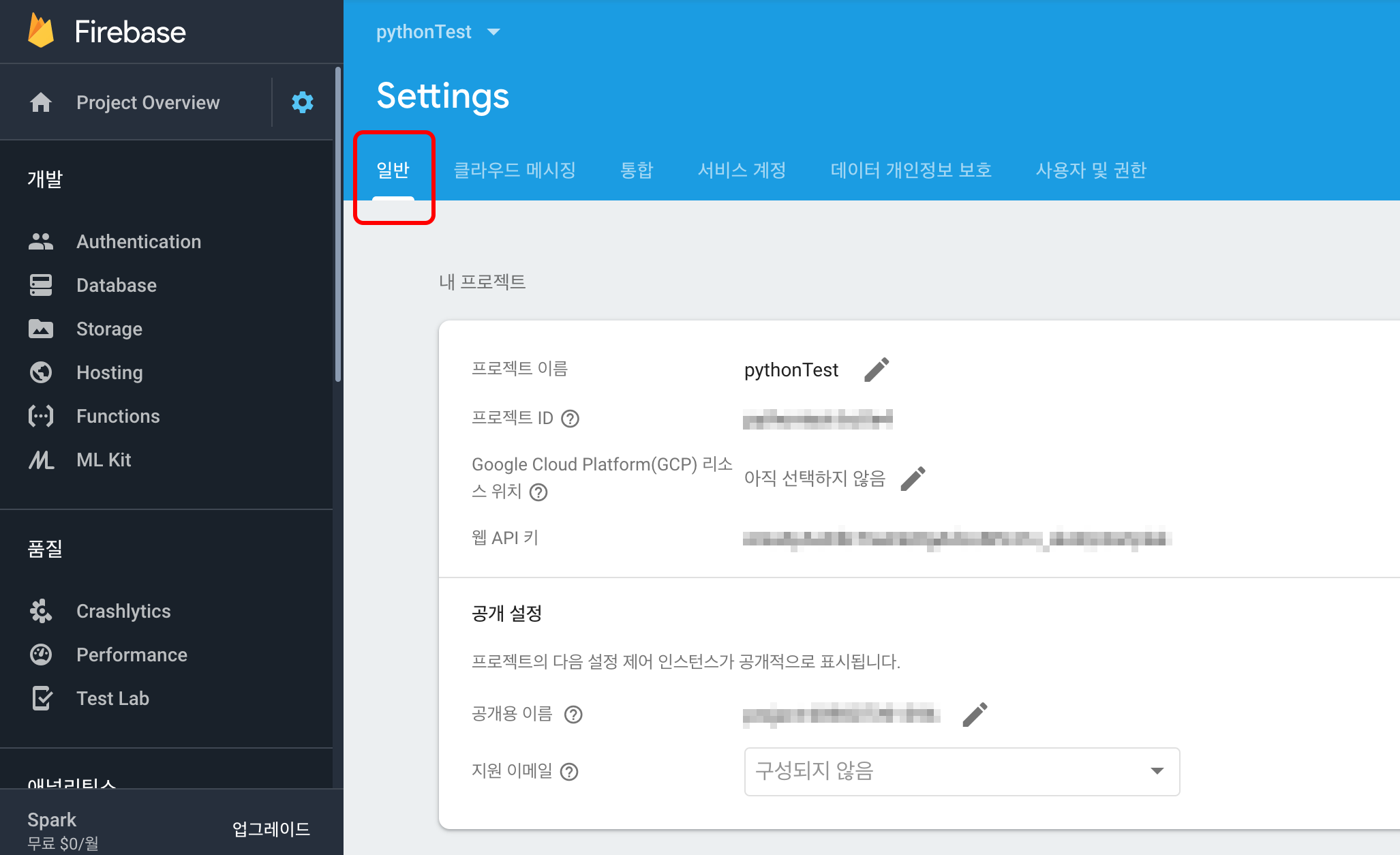

스크롤을 내려서 Firebase SDK snippet에서 CDN을 선택하고 firebaseConfig 부분을 복사해놓으세요.

Database > Realtime Databas를 생성합니다.
프로젝트 생성
$ cd /my/project/path
$ mkdir firstProject
$ code ./firstProject
pyrebase설치
$ pip3 install pyrebase
app.py
$ touch app.pyimport pyrebase
config = {
"apiKey": "AIzaxxxxxxxxxxxxxxx",
"authDomain": "pythontest.firebaseapp.com",
"databaseURL": "https://pythontest.firebaseio.com",
"projectId": "pythontest",
"storageBucket": "",
"messagingSenderId": "68980739xxxx",
"appId": "1:689807391396:web:cedfcfbb5d1xxxxx"
}
firebase = pyrebase.initialize_app(config)
db = firebase.database()
db.child("name").push({"company": "google"})실행하기
$ python3 app.py
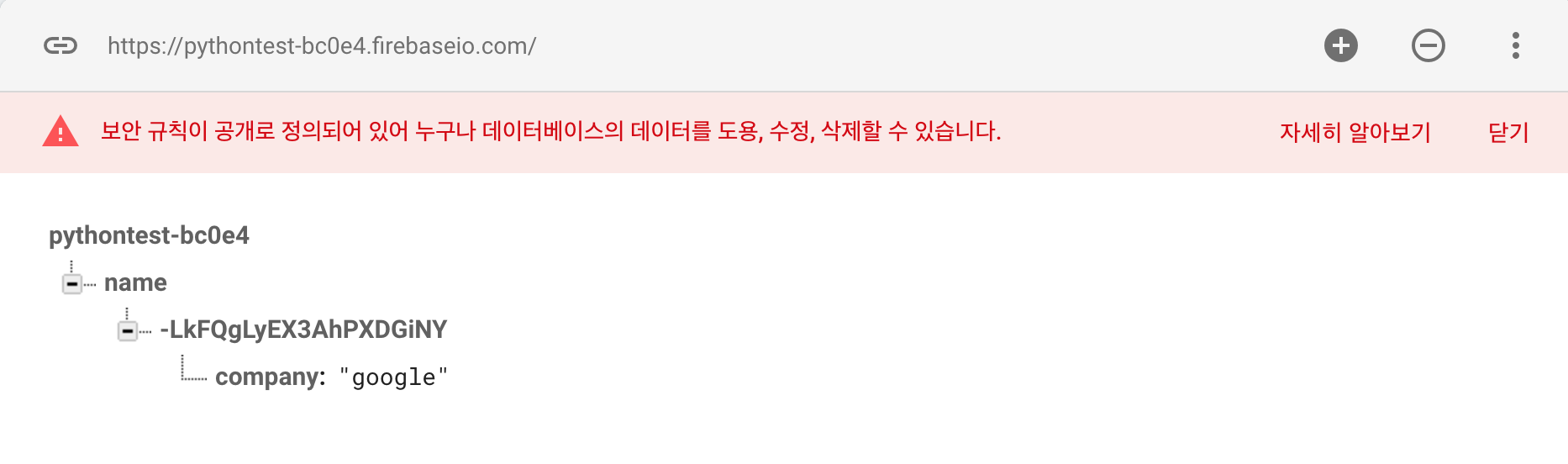
realtime database에 데이터가 추가되었습니다.
update
firebase = pyrebase.initialize_app(config)

db = firebase.database()

# db.child("name").push({"company": "google"})
db.child("name").child("name").update({"company": "google"})
push 대신 update를 사용하면 key없이 값이 생성/수정됩니다.

firebase = pyrebase.initialize_app(config)

db = firebase.database()

# db.child("name").push({"company": "google"})
db.child("name").child("name").update({"company": "apple"})
데이터 가지고 오기
firebase = pyrebase.initialize_app(config)

db = firebase.database()

# db.child("name").push({"company": "google"})
# db.child("name").child("name").update({"company": "google"})

company = db.child("name").child("name").get()
print(company.val())
firebase = pyrebase.initialize_app(config)

db = firebase.database()

# db.child("name").push({"company": "google"})
# db.child("name").child("name").update({"company": "google"})

company = db.child("name").child("name").get()
print(company.key())
삭제하기
firebase = pyrebase.initialize_app(config)

db = firebase.database()

# db.child("name").push({"company": "google"})
# db.child("name").child("name").update({"company": "google"})

# company = db.child("name").child("name").get()
# print(company.key())

db.child("name").remove()
반응형
'Frontend > Firebase' 카테고리의 다른 글
| [Firebase] Storage에 사진 파일 올리기 (0) | 2019.09.24 |
|---|---|
| [Firebase Status Dashboard] Firebase 프로젝트나 앱이 생성되지 않을때... (0) | 2019.07.26 |
| [Firebase] Python Flask 웹 서비스 (1) | 2019.07.21 |
| [Firebase] Firebase 데이터 베이스 생성 [Realtime Database] (0) | 2019.07.14 |
| [Firebase] 호스팅 생성하고 배포하기 (2) | 2019.07.12 |
'Frontend/Firebase' Related Articles
more


Comments