
반응형
Notice
Recent Posts
Recent Comments
Link
| 일 | 월 | 화 | 수 | 목 | 금 | 토 |
|---|---|---|---|---|---|---|
| 1 | 2 | 3 | 4 | |||
| 5 | 6 | 7 | 8 | 9 | 10 | 11 |
| 12 | 13 | 14 | 15 | 16 | 17 | 18 |
| 19 | 20 | 21 | 22 | 23 | 24 | 25 |
| 26 | 27 | 28 | 29 | 30 | 31 |
Tags
- androidstudio
- 센토스
- linux
- 오블완
- VirtualBox
- Chrome
- centos
- localserver
- 티스토리챌린지
- node
- ReactNative
- 네트워크
- 개발
- PYTHON
- MAC
- 맥
- fastapi
- 리눅스
- build
- webpack
- MachineLearning
- react
- unittest
- xcode
- vsCode
- IOS
- TensorFlow
- Android
- pydantic
Archives
- Today
- Total
로메오의 블로그
유사사진 추천하기 Flask + MongoDB + OpenCLIP +FAISS 본문
반응형
가상환경 설정
$ mkdir flask-image-app
$ cd flask-image-app
$ code .
$ python3 -m venv venv
$ source venv/bin/activate
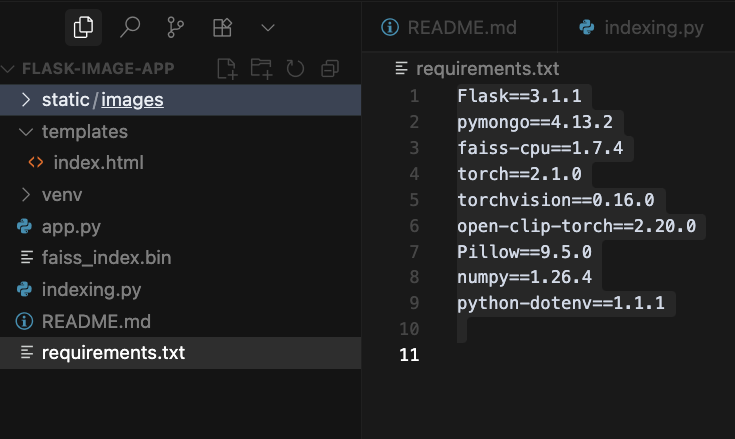
requirements.txt
Flask==3.1.1
pymongo==4.13.2
faiss-cpu==1.7.4
torch==2.1.0
torchvision==0.16.0
open-clip-torch==2.20.0
Pillow==9.5.0
numpy==1.26.4
python-dotenv==1.1.1
$ pip install -r requirements.txt
indexing.py
import os
import faiss
import open_clip
import torch
import numpy as np
from PIL import Image
from pymongo import MongoClient

# 모델 생성 및 전처리 함수 반환
# ViT-B-32 모델 사용
# laion2b_s34b_b79k 버전
model, _, preprocess = open_clip.create_model_and_transforms('ViT-B-32', pretrained='laion2b_s34b_b79k')
device = 'cpu'
model = model.to(device)

# MongoDB 연결
client = MongoClient(os.getenv("MONGO_URL", "mongodb://localhost:27017/"))
db = client["image_db"]
collection = db["images"]

image_dir = './static/images'
# 벡터 인덱스 생성
index = faiss.IndexFlatL2(512)
paths = []

for filename in os.listdir(image_dir):
    if not filename.lower().endswith(('.png', '.jpg', '.jpeg')):
        continue
    path = os.path.join(image_dir, filename)
    image = preprocess(Image.open(path)).unsqueeze(0).to(device)        # 이미지를 모델에 맞게 전처리하고 모델에 전달
    with torch.no_grad():                                               # 메모리 사용량 줄이기 위해 모델 연산 비활성화
        emb = model.encode_image(image).cpu().numpy().astype('float32') # 모델 연산 결과를 numpy 배열로 변환
        emb = emb.reshape(1, -1)                                        # 모델 출력 형태에 맞게 변환
    index.add(emb)                                                      # 벡터 인덱스에 추가
    collection.insert_one({
        "filename": filename,
        "path": path,
        "vector": emb[0].tolist()
    })
    paths.append(path)

faiss.write_index(index, 'faiss_index.bin')
app.py
from flask import Flask, render_template, request, jsonify
from pymongo import MongoClient
import faiss
import open_clip
import torch
import numpy as np
from PIL import Image
import os

app = Flask(__name__)
client = MongoClient(os.getenv("MONGO_URL", "mongodb://localhost:27017/"))
db = client["image_db"]
collection = db["images"]

# 모델과 인덱스 로드
model, _, preprocess = open_clip.create_model_and_transforms('ViT-B-32', pretrained='laion2b_s34b_b79k')
model.eval().to('cpu')
index = faiss.read_index('faiss_index.bin') # 벡터 인덱스 로드

@app.route('/')
def home():
    images = list(collection.find().limit(100))
    return render_template('index.html', images=images)

@app.route('/similar', methods=['POST'])
def similar():
    data = request.json
    filename = data['filename']
    image = Image.open(os.path.join('static/images', filename))

    # 이미지를 모델에 맞게 전처리하고 모델에 전달
    image_tensor = preprocess(image).unsqueeze(0)
    with torch.no_grad():
        # 이미지를 모델에 맞게 전처리하고 모델에 전달
        vector = model.encode_image(image_tensor).cpu().numpy().astype('float32')
    D, I = index.search(vector, 10)                     # 벡터 인덱스에서 가장 가까운 이미지 검색
    skip_index = int(I[0][1])                           # 자기 자신을 제외한 가장 가까운 이미지의 인덱스
    results = list(collection.find().skip(skip_index))  # 자기 자신을 제외한 가장 가까운 이미지의 인덱스
    return jsonify([r['filename'] for r in results])

if __name__ == '__main__':
    app.run(debug=True, port=7000, use_reloader=True)
template/index.html
<!DOCTYPE html>
<html>
<head>
  <meta charset="utf-8">
  <title>Image Viewer</title>
  <style>
    body {
      font-family: sans-serif;
    }
    #image-list img {
      cursor: pointer;
      margin: 5px;
      border: 2px solid transparent;
      transition: border 0.2s;
    }
    #image-list img:hover {
      border: 2px solid #007bff;
    }
    #popup-overlay {
      position: fixed;
      top: 0; left: 0;
      width: 100%; height: 100%;
      background: rgba(0, 0, 0, 0.7);
      display: none;
      justify-content: center;
      align-items: center;
      z-index: 9999;
    }
    #popup-content {
      background: white;
      padding: 20px;
      max-width: 90%;
      max-height: 90%;
      overflow: auto;
      border-radius: 8px;
      position: relative;
    }
    #popup-content h3 {
      margin-top: 0;
    }
    #popup-images {
      position: relative;
      display: flex;
      align-items: center;
      justify-content: center;
    }
    #popup-main-image {
      max-width: 80%;
      max-height: 70vh;
      object-fit: contain;
    }
    .nav-button {
      position: absolute;
      top: 50%;
      transform: translateY(-50%);
      background: rgba(0, 0, 0, 0.7);
      color: white;
      border: none;
      padding: 15px 10px;
      cursor: pointer;
      font-size: 18px;
      border-radius: 5px;
      transition: background 0.3s;
    }
    .nav-button:hover {
      background: rgba(0, 0, 0, 0.9);
    }
    .nav-button:disabled {
      background: rgba(0, 0, 0, 0.3);
      cursor: not-allowed;
    }
    #prev-button {
      left: 10px;
    }
    #next-button {
      right: 10px;
    }
    #close-button {
      position: absolute;
      top: 10px;
      right: 10px;
      background: rgba(0, 0, 0, 0.7);
      color: white;
      border: none;
      padding: 5px 10px;
      cursor: pointer;
      border-radius: 3px;
    }
    #image-counter {
      position: absolute;
      bottom: 10px;
      left: 50%;
      transform: translateX(-50%);
      background: rgba(0, 0, 0, 0.7);
      color: white;
      padding: 5px 10px;
      border-radius: 3px;
      font-size: 14px;
    }
  </style>
</head>
<body>
  <h1>Image Gallery</h1>
  <div id="image-list">
    {% for image in images %}
      <img src="/static/images/{{ image.filename }}" width="100" onclick="showSimilar('{{ image.filename }}')">
    {% endfor %}
  </div>

  <!-- 팝업 오버레이 -->
  <div id="popup-overlay" onclick="closePopup()">
    <div id="popup-content" onclick="event.stopPropagation()">
      <button id="close-button" onclick="closePopup()">×</button>
      <h3>Similar Images</h3>
      <div id="popup-images">
        <button id="prev-button" class="nav-button" onclick="navigateImage(-1)">‹</button>
        <img id="popup-main-image" src="">
        <button id="next-button" class="nav-button" onclick="navigateImage(1)">›</button>
        <div id="image-counter"></div>
      </div>
    </div>
  </div>

  <script>
    let currentImages = [];
    let currentIndex = 0;

    async function showSimilar(filename) {
      const res = await fetch('/similar', {
        method: 'POST',
        headers: { 'Content-Type': 'application/json' },
        body: JSON.stringify({ filename })
      });

      if (!res.ok) {
        alert("서버 오류 발생");
        return;
      }

      const data = await res.json();
      currentImages = [filename, ...data];
      currentIndex = 0;

      updatePopupImage();
      document.getElementById('popup-overlay').style.display = 'flex';
    }

    function updatePopupImage() {
      const mainImage = document.getElementById('popup-main-image');
      const counter = document.getElementById('image-counter');
      const prevButton = document.getElementById('prev-button');
      const nextButton = document.getElementById('next-button');

      mainImage.src = `/static/images/${currentImages[currentIndex]}`;
      counter.textContent = `${currentIndex + 1} / ${currentImages.length}`;

      // 버튼 활성화/비활성화
      prevButton.disabled = currentIndex === 0;
      nextButton.disabled = currentIndex === currentImages.length - 1;
    }

    function navigateImage(direction) {
      const newIndex = currentIndex + direction;
      if (newIndex >= 0 && newIndex < currentImages.length) {
        currentIndex = newIndex;
        updatePopupImage();
      }
    }

    function closePopup() {
      document.getElementById('popup-overlay').style.display = 'none';
      currentImages = [];
      currentIndex = 0;
    }

    // 키보드 네비게이션
    document.addEventListener('keydown', function(event) {
      if (document.getElementById('popup-overlay').style.display === 'flex') {
        if (event.key === 'ArrowLeft') {
          navigateImage(-1);
        } else if (event.key === 'ArrowRight') {
          navigateImage(1);
        } else if (event.key === 'Escape') {
          closePopup();
        }
      }
    });
  </script>
</body>
</html>
mongodb 데이터 확인
$ docker exec -it mongo bash
$ mongo -u romeoh -p 'GXXXXX$' --authenticationDatabase admin
$ show dbs
$ use image_db
$ show collections
$ db.image.find().pretty()


반응형
'Backend > Python & Blockchain' 카테고리의 다른 글
| python 가상환경 설정 (4) | 2025.07.27 |
|---|---|
| TensorFlow 사진 분류기 (7) | 2025.07.26 |
| Synology NAS에 python flask 웹서버 구축 (2) | 2025.07.18 |
| FastAPI 서버 구축 (0) | 2025.05.19 |
| Python3 SSL: CERTIFICATE_VERIFY_FAILED 해결하기 - Mac (0) | 2024.02.02 |
'Backend/Python & Blockchain' Related Articles
more


Comments